Selling on autopilot with a kiosk
A self-service kiosk can be a lifesaver during the rush, or any time you want to run leaner on staff. Guests browse the menu at their own pace, order what they want, pay, and you can focus on the floor.
Kiosk screens are included in every 20Tabs plan. You add one under Devices in the Backoffice, where this device type is called Self-scan screen.
New to devices? Start with Managing and using devices.
Setting up the kiosk
Once you’ve added a kiosk device in the Backoffice, log in on the device and pick that kiosk from the list. Need more than one, say a second screen for the weekend? Just add another device.
What your guest sees
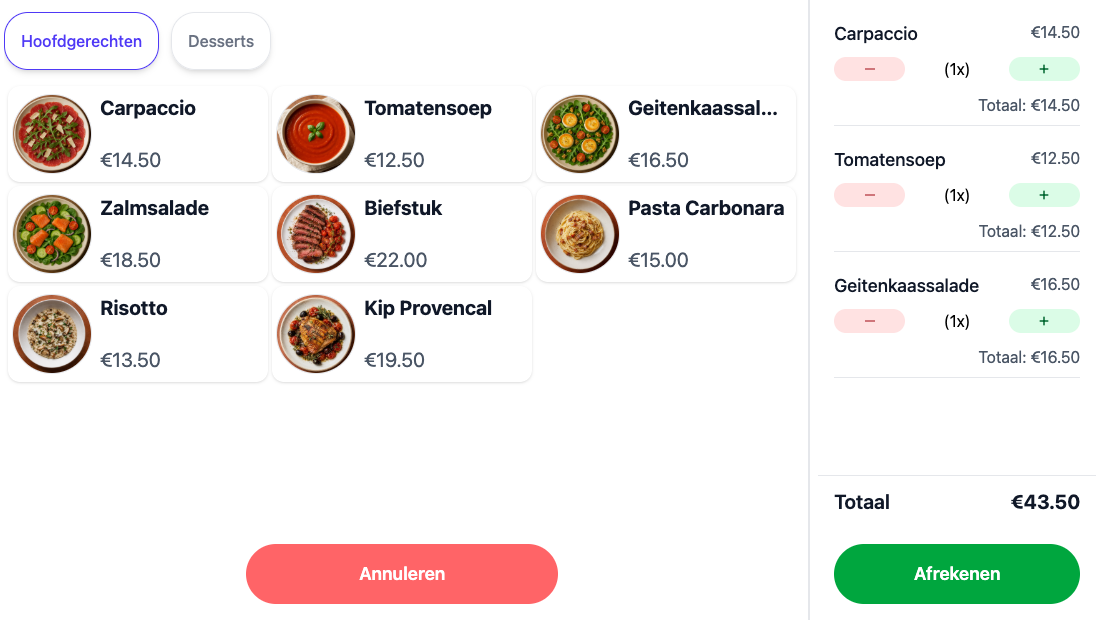
The kiosk works from the same products as your till. Under Quickselect page you pick which page of buttons the kiosk shows, so you can put a shorter menu on it than the one behind the bar.
- Lay the page out like any other till screen, see Setting up your POS with buttons.
- Attach images to your products and the kiosk shows them large. See Showing images on buttons.
- Option groups on a product are asked as questions on the kiosk, including any surcharge.
Change something in the Backoffice and it is on the kiosk straight away.
The start screen
Between two orders the kiosk shows a start screen.
- Start message is the line your guest sees, Click to start by default.
- Background image fills the whole screen instead. Upload one and it replaces the logo and the start message.
- Timeout (in seconds) sets how long the kiosk waits without a touch before it returns to the start screen, so an order somebody walked away from does not sit there.
Checking out
Under Primary payment method you pick how your guest pays. With a linked card terminal or Tap to Pay on the device itself, the payment starts right after ordering.
- Show QR to download receipt after checkout lets your guest pull up their receipt on their phone, so there is no receipt printer to stand next to the kiosk.
- Want paper anyway? Link a printer to the kiosk device.
- Success timeout and Fail timeout set how long the screen stays up after a successful or failed payment.
- Split direction sets where the receipt sits on screen: on the right when horizontal, on top when vertical.
Ordering with a customer card
If your guest has a card, they hold it against the kiosk scanner. The order goes onto their tab or comes off their balance, and it counts towards your loyalty programme. See Customer cards.
Orders in the kitchen
An order from the kiosk comes in like any other order. Through the preparation location on your products, dishes go to the kitchen and drinks go to the bar. See Preparation locations.
The kiosk’s revenue comes back in your reports like any other point of sale.
What hardware to use
20Tabs runs on both new kit and equipment you already own. For the smoothest kiosk experience, we recommend hardware with Tap to Pay built in. That way guests can order and pay on the same device, with no separate card terminal in the loop.
Want a hand picking the right hardware? Drop us a line via the contact page.