Your own AI, connected to your restaurant POS

Keep using ChatGPT or Claude the way you already do. Ask anything about your business, or let your AI manage your POS. 20Tabs connects it securely to your live POS data.

Plain language

No digging through reports. Just ask, the way you'd ask a colleague

Live data

Answers built on your real numbers, not gut feeling

AI advises, you decide

From menu advice to pricing, the final call is always yours

Securely connected

Sign in with your own 20Tabs account and stay in control of who has access

ChatGPT
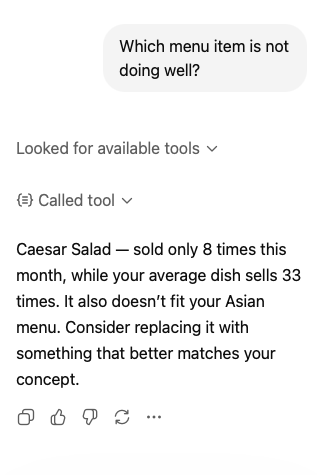
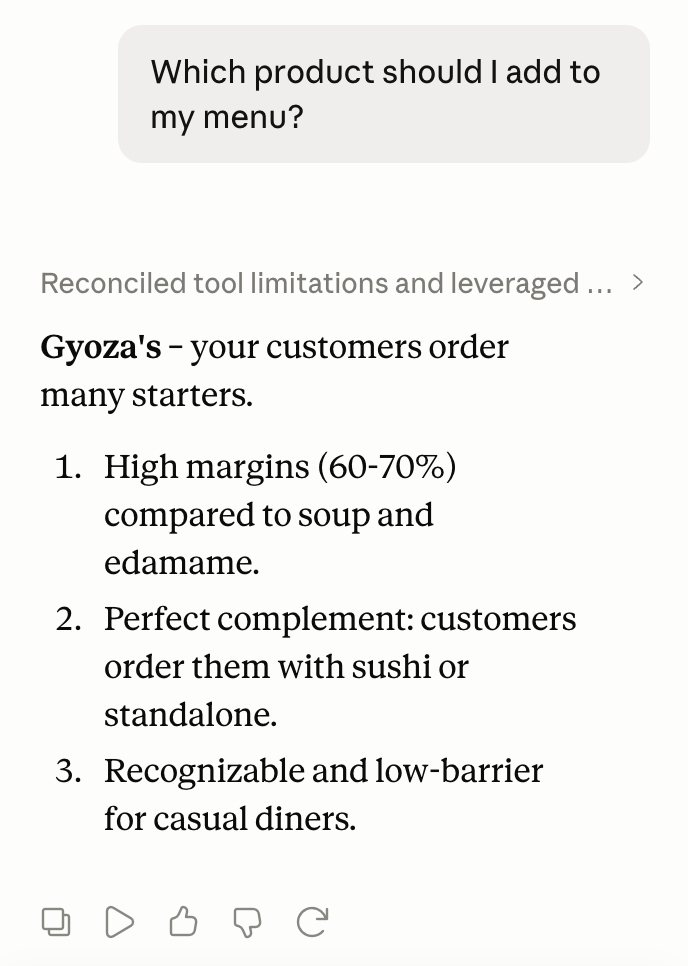
ChatGPT answering a menu question with live 20Tabs data
Claude
Claude giving menu advice with live 20Tabs data

Answers based on live data from 20Tabs

AI

A sparring partner that knows your numbers

The 20Tabs AI connector gives ChatGPT and Claude secure access to your POS data, so you can talk through your menu, your revenue and your busiest hours with an assistant that knows your real numbers. And it goes beyond insight: your AI can manage almost everything in your POS for you.

Reports and trends

"How did the terrace do this weekend compared to last year?" Revenue, bestsellers and trends, answered on the spot from live POS data.

Menu advice

AI sees what sells and what doesn't, helps you shape new dishes and prices, and then adds them to your menu for you.

Let AI manage your POS

New products, price changes, POS buttons, tables, product options: just ask, and it's done in your POS.

How it works

Works with ChatGPT and Claude

Install the integration through the 20Tabs App Store in your backoffice. You sign in with your own 20Tabs account, so you decide who gets access.

Claude AI integration

Claude

Add 20Tabs as a connector in Claude with a single click and ask your first question right away.

✓ Connected in one click
✓ Works in the app and on claude.ai
ChatGPT integration

ChatGPT

Add 20Tabs as a connector in ChatGPT with a single click and ask your first question right away.

✓ Connected in one click
✓ Works in the app and on chatgpt.com

You'll find the AI integration in the 20Tabs App Store in your backoffice. Prefer a walkthrough? Read the guide Connecting ChatGPT or Claude to your POS.

FAQ

Frequently asked questions about AI in your POS

What can AI do for my restaurant?

Connected to 20Tabs, your AI assistant answers questions about revenue, sales trends and your menu using live POS data. Ask things like "how did the terrace do this weekend?" or "which dish sells worst?". It can also advise on pricing, and update products or POS buttons for you.

How do I connect ChatGPT or Claude to my POS?

Install the AI integration through the 20Tabs App Store in your backoffice. Both Claude and ChatGPT connect in one click; you sign in with your own 20Tabs account.

Is it safe to give AI access to my POS data?

You grant access by signing in with your own 20Tabs account, just like other integrations. Prefer AI that only watches? Choose read-only access when connecting. And you can always revoke access by removing the connector in your AI app.

Can AI also change things in my POS?

Yes. Beyond answering questions, your AI assistant can manage almost everything you'd normally handle in the backoffice: products and prices, POS buttons, product options, tables and more. Give the instruction in plain language and the change lands in your POS right away. Rather not? Connect with read-only access and AI keeps its hands off.

Which AI assistants work with 20Tabs?

ChatGPT and Claude. The integration uses the open MCP standard, so other AI apps that support MCP can connect to your 20Tabs POS as well. Get in contact with us to add more apps!

Ready to get started?

are a great day to get started with 20Tabs

Every feature is unlocked from day one. No contracts to sign, no haggling, no sales calls. Just software that works and that you can set up yourself. Curious how quickly we reply? Hit the chat button in the corner and see for yourself.

Try it free

Spin up a full account in minutes, with every feature unlocked.

Up and running in an hour

Process your first order within the hour. Our quick-start guide walks you through every step.

Try for free