Self-service kiosk for hospitality

A self-order terminal where your guest orders and pays themselves. Lift revenue, take pressure off your team, and stay open longer without adding shifts.

Lighter on staff

Orders go straight to the kitchen or bar, no middleman

Easy for anyone

Big buttons and a clear flow that works for everyone

Grab & Go

Perfect for a quick coffee, snack or refill even unattended

Included

Fully unlocked in every 20Tabs plan, no add-ons

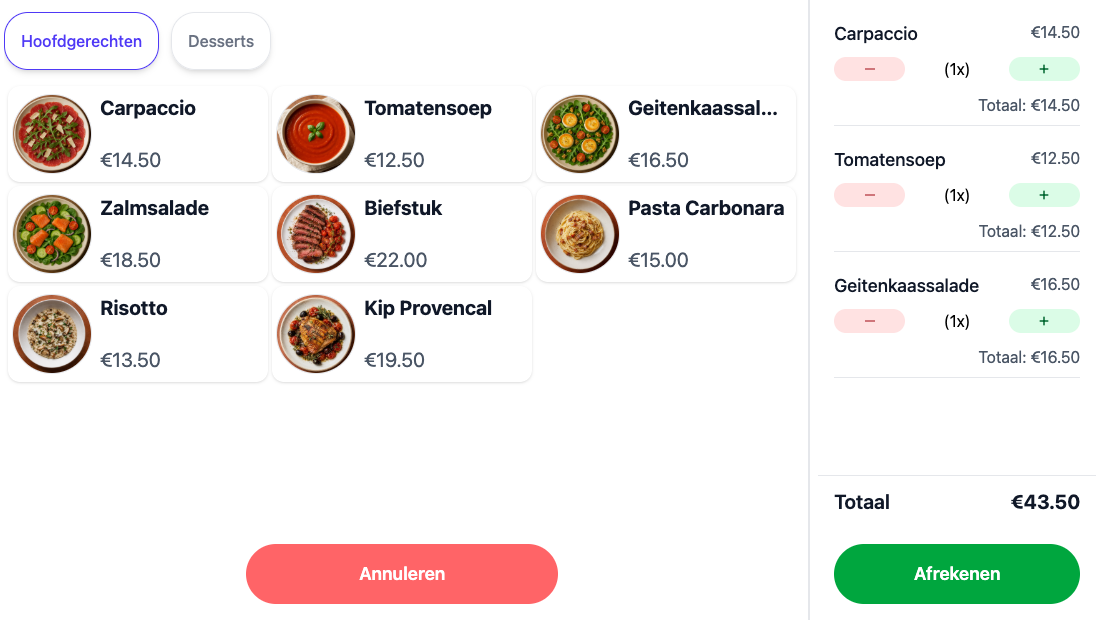
A self-ordering screen with photos on the products and the order beside it
Setting it up

No second system, one menu

You manage the kiosk in the same place as your till. Whatever you change is on it straight away, and every order comes in like any other: on the receipt in your till, on the screen in the kitchen and in your reports.

Photos on your products

Link an image to a product and the kiosk shows it large. A guest who does not know your menu picks more quickly for it

Laid out like a till screen

You build the kiosk from the same products, buttons and categories you know from your till, with no separate menu to keep up to date

Your own start screen

Between two orders the kiosk shows your own image or your own line of text, and after checkout it returns there by itself

Options

Every order right the first time

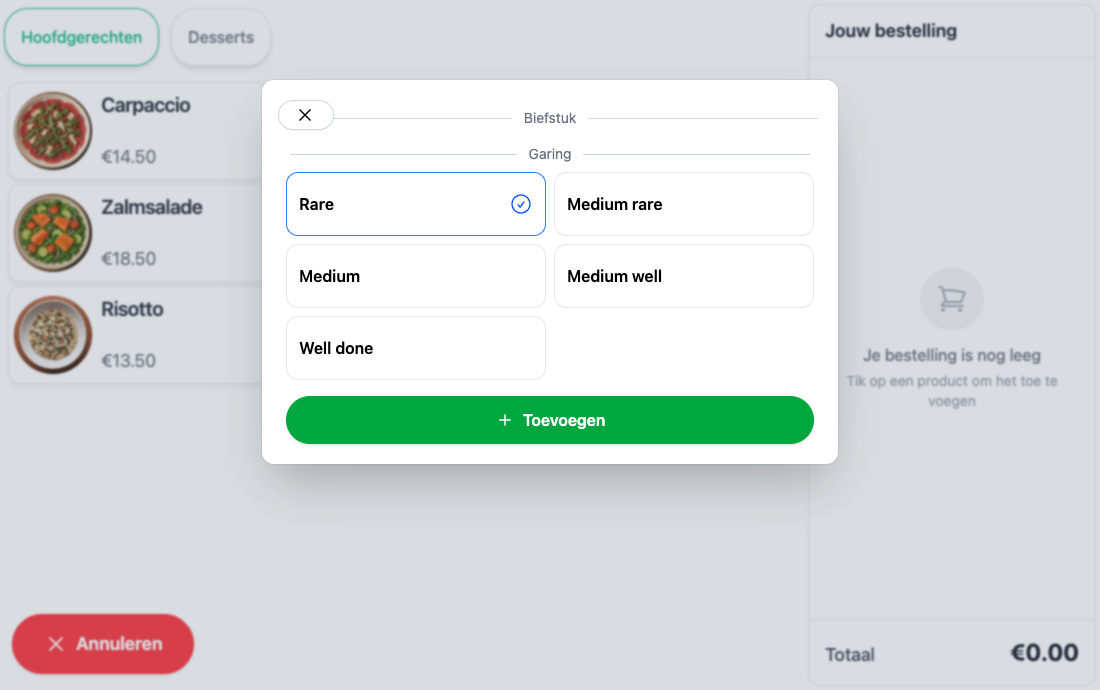
How would you like your steak? Which sauce with that? The kiosk asks exactly what your floor staff asks, only your guest has all the time in the world. They tap their answer, the kitchen gets the order complete, and no plate comes back because somebody forgot to pass something on.

The same options as on the till

Set them up once and they work everywhere, surcharges and discounts included

An extra sells itself

A guest choosing for themselves adds an extra topping or a larger size without thinking twice

A question after a question

Pick a bottle of wine and the screen asks how many glasses to bring with it

Written on the receipt

Every choice sits under its line, so the kitchen and your guest read the same thing

The kiosk asking how the steak should be cooked
How it works

One order, start to finish

Start screen, pick a dish, add the options, pay on the terminal or with Tap to Pay, and take the receipt as a QR code. Without anyone stepping out from behind the bar.

Curious how you set one up? It is laid out step by step in the guide.

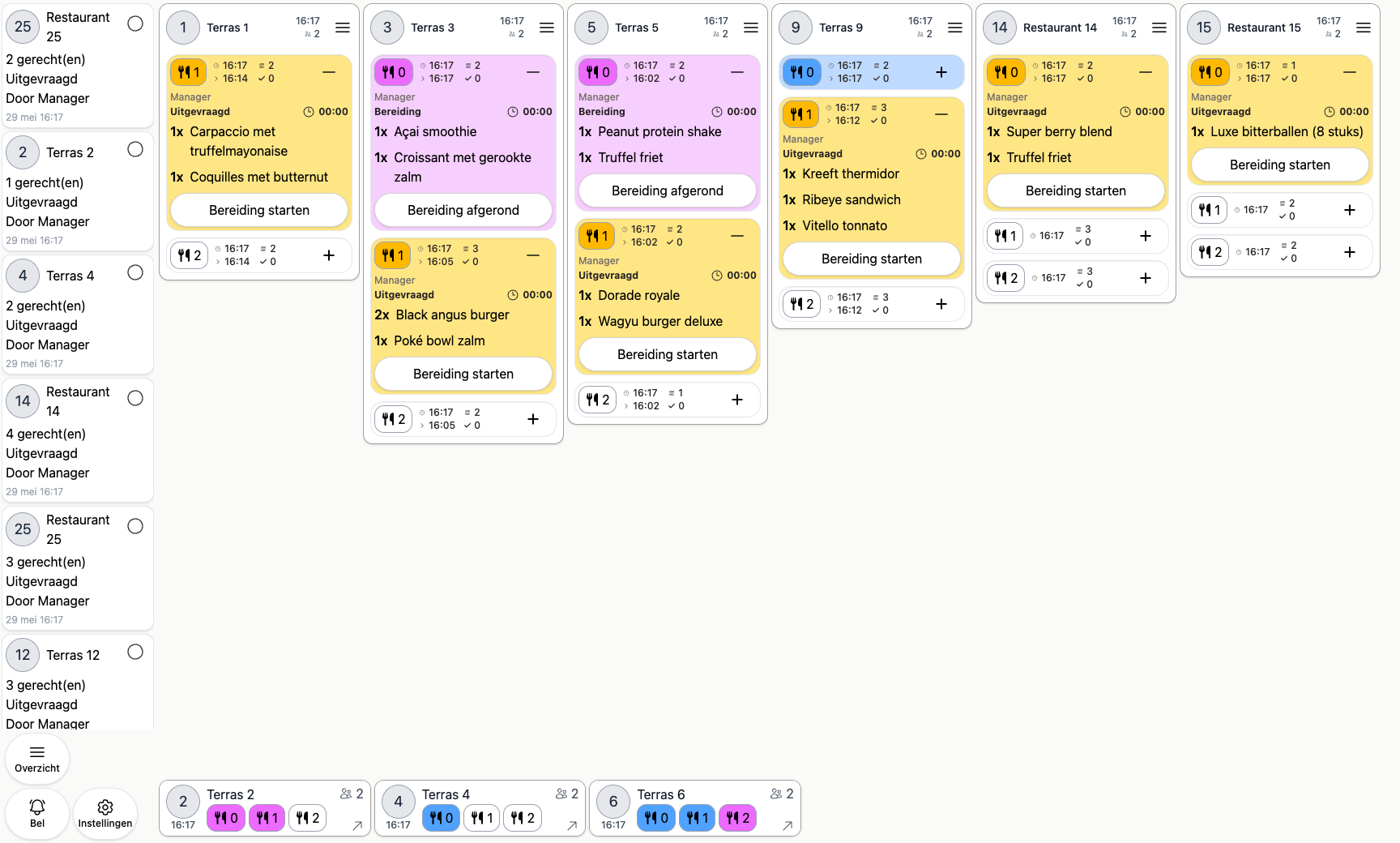
The kitchen preparation screen with incoming orders
Kitchen and bar

Wired into your kitchen

An order from the kiosk is not a loose slip somebody has to pick up. It lands on the same preparation screen as the orders from your floor staff, in the order it came in.

On the same preparation screen

The kitchen sees a kiosk order among the rest and does not have to watch two places at once

Dishes to the kitchen, drinks to the bar

The preparation location on your products sends every line to the right screen or the right printer

The moment they have paid

The order is on the screen as soon as your guest has paid, without anyone having to pass it on first

Receipt

The receipt lives on in your guest's phone

When your guest scans the QR code on the success screen, their receipt simply opens in the browser. No paper roll needed, and they keep it themselves.

Everything is on it

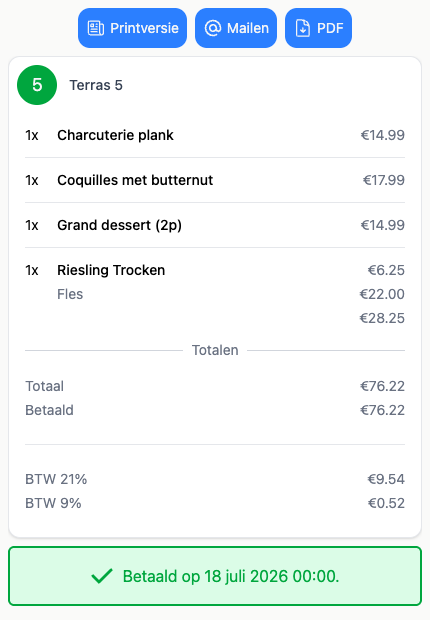
Lines, total, the VAT per rate and when it was paid, exactly what a guest needs for their own bookkeeping

Email it or save it as a PDF

The guest chooses whether to email, print or download the receipt, without you having to do anything

No paper at a screen with nobody behind it

It saves a printer to refill at a kiosk that otherwise runs entirely on its own

The online receipt a guest sees after scanning the QR code
Customer card

Self-ordering, tied into your loyalty programme

Not every guest wants to tap a card for every round. Anyone with a customer card holds it against the scanner: the order goes onto their tab or comes off their balance, exactly as it would at the bar. A guest collecting points or carrying a balance comes back.

Order on the card

One scan puts the order on your guest's tab, with no card payment at the screen

A look at the tab

Scanning on the start screen shows everything charged to that tab so far

Balance and points keep counting

An order from the kiosk counts towards your loyalty programme, just like one from the till

Grab & Go

Save on staff

Everything above happens with nobody standing there. Your guest orders, pays and takes their order with them, while your people keep working in the kitchen or behind the bar.

Hands free when it counts

Nobody has to walk to the till for every coffee, exactly when you can least spare them

Pay on the kiosk

On a linked card terminal or with Tap to Pay on the screen itself, contactless and without waiting

Grab & Go

Keep selling outside your usual opening hours, with zero staffing

Hardware

We can supply the hardware too

Want a turn-key setup delivered to your door? We've got you covered.

All-in-one kiosk

Touchscreen, receipt printer and built-in card terminal, a complete self-order terminal in a single unit.

Other hardware

From POS stations to card terminals and printers, we can put together the full setup.

Ready to get started?

are a great day to get started with 20Tabs

Every feature is unlocked from day one. No contracts to sign, no haggling, no sales calls. Just software that works and that you can set up yourself. Curious how quickly we reply? Hit the chat button in the corner and see for yourself.

Try it free

Spin up a full account in minutes, with every feature unlocked.

Up and running in an hour

Process your first order within the hour. Our quick-start guide walks you through every step.

Try for free