At the table

QR ordering at the table

Guests scan the QR code on their table, pick from your menu and order. No waiting for someone to come by. The order is in the kitchen right away and on that table's bill.

Try it yourself
Order at a table in our demo restaurant
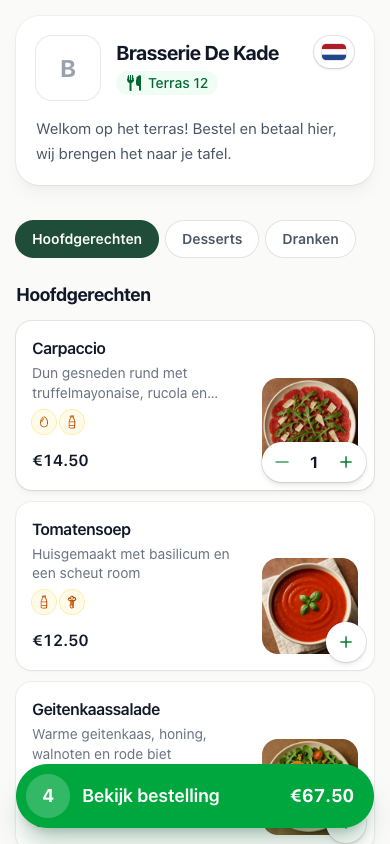
The menu a guest sees after scanning the QR code on table Terras 12
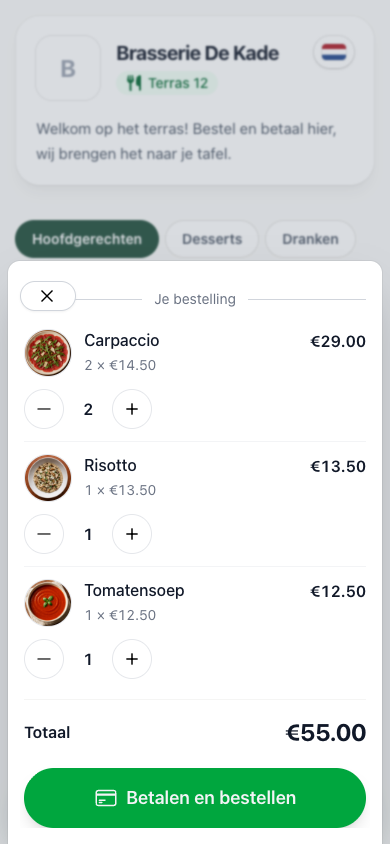
The order for table Terras 12, ready to send
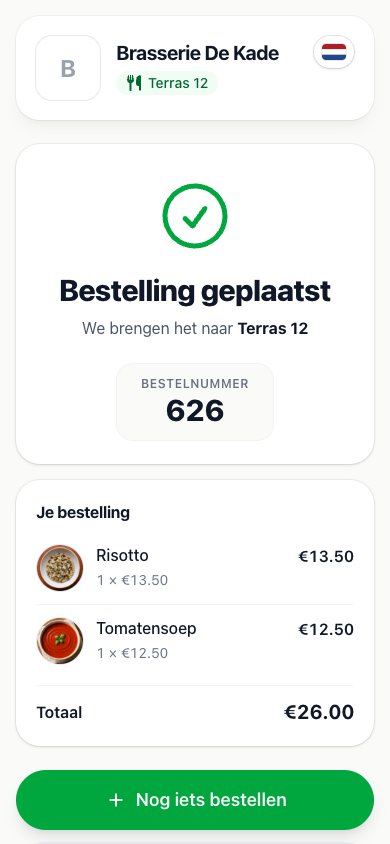
The confirmation with order number, brought to Terras 12

Another round

Every round lands on the same table bill

Straight to the kitchen

Your staff never have to pass an order on

Multilingual

Your menu appears in the guest's own language, automatically

Included

No extra costs and no commission per order

Payment

Pay per round or afterwards

A terrace with guests coming and going works differently from a table that stays all evening. You choose per ordering page how guests pay.

Pay upfront, per round

A fixed QR sticker on every table. Guests order, pay online and the order goes to the kitchen.

  • Whatever is ordered by QR is already paid
  • "Order something else" starts the next round
  • Ideal for terraces, beach bars and busy cafés

Pay afterwards

Staff print a QR code for the table from the POS. Guests use it to order more whenever they like, and settle up at the end.

  • Settle at the table or through the online bill
  • The QR code stops working once the bill is paid
  • Ideal for all-you-can-eat and tables that stay all evening
QR codes

A QR code for every table, in one download

Your tables are already in 20Tabs. One click creates a QR code for all of them, ready to print on stickers or table stands.

Neatly named

Every QR code carries the name of its table, like Terras 12, so each sticker goes straight to the right spot

Straight onto the right bill

Every QR code belongs to a table from your POS. Whatever the guest orders lands on that table's bill automatically

Merging bills is fine

When staff push two tables together, guests simply keep ordering on the merged bill

QR codes for all tables
33 tables
Ready
Terras 10
Terras 11
Terras 12
Zaal 1
Zaal 2
Bar 1
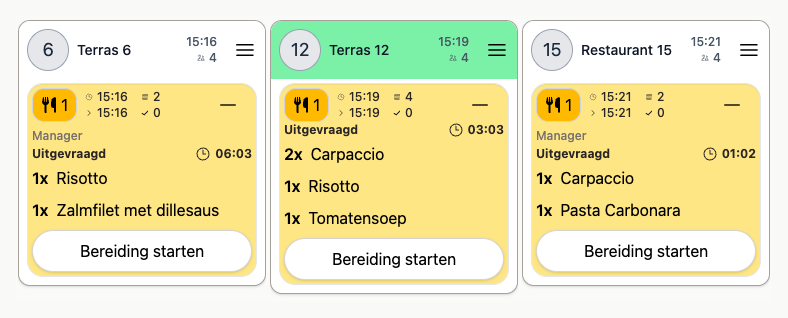
The kitchen display with the order from Terras 12 between the other tables
Kitchen and bar

From the table straight to the kitchen

A QR order isn't a note someone has to pick up. It goes straight to the right kitchen display or printer, just like an order from your staff.

Food to the kitchen, drinks to the bar

Every line goes to the product's preparation location, with your courses applied

Recognisable on the POS

Give QR orders their own bill colour and marker, so staff can see where they came from

Complete the first time

Guests pick doneness, sauce and notes themselves, with the same options as on your POS

Menu

One menu, the same everywhere

Pick a button page from your POS as the menu. Whatever you change there is on the table right away.

Allergens in view

The fourteen EU allergens are shown on every dish, and you can add anything else your guests should know

Sold out means sold out

When a dish runs out, it can't be ordered at the table either

In your own style

Your logo, your colours and a welcome text like "Order here, we'll bring it to your table"

Pickup too?

With the same menu you can also put an ordering page online for pickup, with pickup times your kitchen can keep up with.

See online ordering
Ready to get started?

are a great day to get started with 20Tabs

Every feature is unlocked from day one. No contracts to sign, no haggling, no sales calls. Just software that works and that you can set up yourself. Curious how quickly we reply? Hit the chat button in the corner and see for yourself.

Try it free

Spin up a full account in minutes, with every feature unlocked.

Up and running in an hour

Process your first order within the hour. Our quick-start guide walks you through every step.

Try for free